## To manage relative paths
library(here)

## Publish data sets, models, and other R objects
library(pins)
library(qs2)

## To transform data that fits in RAM
library(data.table)
library(lubridate)

## To create plots
library(ggplot2)
library(ggiraph)

## Custom functions
devtools::load_all()

## Defining the print params to use in the report
options(datatable.print.nrows = 15, digits = 4)

# Defining the pin boards to use
BoardLocal <- board_folder(here("../NycTaxiPins/Board"))Data Sampling
As we have a very large dataset and it doesn’t include one of the target variables we want to predict, we need to apply the following steps:
- Selecting a representative subset of the data
- Adding the new target variable
take_current_trip
This will help us to have more meaningful results during the Data Understanding phase.
Loading packages to use
Sampling data to use
Selecting the 0.20% of the data, aiming for around 500K samples for training and testing the model and saving the data in a binary file.
## Establishing a connection with the database
con <- DBI::dbConnect(
  duckdb::duckdb(),
  dbdir = here("../NycTaxiBigFiles/my-db.duckdb")
)

## Defining query to sample
ValidZoneSampleQuery <- glue::glue(
  "
SELECT t1.*
FROM NycTrips t1
INNER JOIN ZoneCodesFilter t2
  ON t1.PULocationID = t2.PULocationID AND
     t1.DOLocationID = t2.DOLocationID
USING SAMPLE 0.20% (system, 547548);
"
)

## Sampling data from db
ValidZoneSample <- DBI::dbGetQuery(con, ValidZoneSampleQuery)

## Closing the database connection
DBI::dbDisconnect(con, shutdown = TRUE)

## Saving results to disk
BoardLocal |> pin_write(ValidZoneSample, "ValidZoneSample", type = "qs2")
Adding take_current_trip to sample
Purpose
The purpose of this variable is to compare each trip with potential trips that a taxi driver could take in the following minutes and determine if it’s better to accept the current trip request or wait for a more profitable trip in the following minutes.
Assumptions
To answer this question, we will need assumptions similar to those used in simulating a taxi driver’s decision-making process specially to select the valid trips that need to be taken in consideration to compare with.
For a trip to be considered valid, it must meet the following requirements:
The trip corresponds to the same company as the original trip request.
Only if the original trip request specified a wheelchair-accessible vehicle (WAV), future WAV trips will be eligible.
The trip was requested from 3 seconds (time needed to reject a trip request) up to 15 minutes after the original request time.
The trip start point is located in valid distance from the start point of the original trip (assuming the taxi driver is in that point) based on the relate time the trip was requested based on the request time of the original trip
0-1 Minute: Only 1-mile radius is valid.
1-3 Minutes: Expand up to 3-mile radius.
3-5 Minutes: Expand up to 5-mile radius.
Keep adding 2 miles until completing the allowed 15 minutes.
Implementation
Since this process is resource-intensive and each iteration is independent, running it in parallel as a multicore process (supported by future) is optimal. This approach utilizes the full capacity of my computer, which has 8 cores and 17 GB of RAM.
The only disadvantage of this approach that my current IDE (Rstudio) don’t support this process, but it can be run without issues from the linux terminal by writing the process on Rscript files.
The process was implemented in the add_take_current_trip() which has been tested to ensure it meets expectations, as confirmed in the Github file.
Tuning parallel process
Before running a process 500k times, it’s important to make sure we are using the best configuration due the code and the hardware were are using.
In our case we focus in defining best values for:
Number of cores used by
data.tableNumber of cores used by
futureChunk.size used by
futureScheduling used by
future
For that reason we have created the multicore-scripts/01-fine-tune-future-process.R script, which print the time needed for each process on the terminal after completing each one.
Rscript ~/NycTaxi/multicore-scripts/01-fine-tune-future-process.RThe below plot summaries the obtained results.
And as we can see the got better performance by using fewer cores for future, due the RAM capacity limit, when using only 4 cores and increasing the number of task per core we can see the time needed to complete the 2k samples it’s reduced as it didn’t use the SWAP memory while running the process, as we can see in the next screenshot.
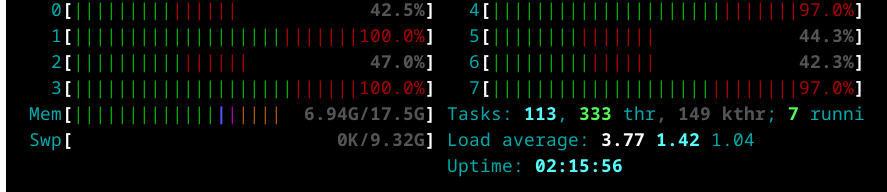
And after checking this results we ended with the next configuration:
Number of cores used by
data.table: 8Number of cores used by
future: 4Chunk.size used by
future: 200Scheduling used by
future: 0.6
Running process
Once we know how to set up the parallel process we need to run it month by month and save the results to avoid losing the progress in case of any process fail.
As this process was very demanding for my computer so we preferred to run each month on individual R session to avoid filling the memory by using the next bash script and passing the each month as param for the Rscript.
#!/bin/bash

# Check if the correct number of arguments is provided
if [ "$#" -ne 3 ]; then
  echo "Usage: $0 <script_path> <start_number> <end_number>"
  exit 1
fi

# Assign arguments to variables
SCRIPT_PATH=$1
START_NUM=$2
END_NUM=$3

# Loop through the given range and run the R script
for i in $(seq $START_NUM $END_NUM)
do
  Rscript $SCRIPT_PATH $i
done
Once defined the bash script we can use it by running the next command in the terminal.
bash multicore-scripts/02-run_add_target.sh multicore-scripts/02-add-target.R 1 24Here we can see that the 24 files have been saved as fst binnary files.
BoardLocal |> pin_list() |> grep(pattern = "OneMonth", value = TRUE) |> sort()
#>  [1] "OneMonthData01" "OneMonthData02" "OneMonthData03" "OneMonthData04"
#>  [5] "OneMonthData05" "OneMonthData06" "OneMonthData07" "OneMonthData08"
#>  [9] "OneMonthData09" "OneMonthData10" "OneMonthData11" "OneMonthData12"
#> [13] "OneMonthData13" "OneMonthData14" "OneMonthData15" "OneMonthData16"
#> [17] "OneMonthData17" "OneMonthData18" "OneMonthData19" "OneMonthData20"
#> [21] "OneMonthData21" "OneMonthData22" "OneMonthData23" "OneMonthData24"